Friday, 15 October 2010

Organisation and Schedule

Next week, me and Matt plan to film all, if not most of the parts of the detective character in the video. So as we know what we're doing on each day, and so as we can gain the materials within enough time to be comfortable with filming, we've created a make-shift schedule. The schedule goes as follows:


Monday 18th

Location(s): Civic Centre (steps and pavement)
Wants Library (bookshelves)
Central Park (with golf clubs/balls and Matt in golfers costume)

Filming: Driving Range section
Rope trip section
Library section


Sound: No extra sound needed as well as no lip-sync.


Tuesday 19th

Location: Robert Clack Drama Room
Filming: Girl Changing Scene (bring to bring his prettiest skirt and the wig)
Matt's Costume Parade :D


Sound: No extra sound needed and no lip-sync required.


Wednesday 20th

Location: Any random old street - hopefully in a location not very well known to local
audiences and other people in the class (maybe Ilford or Romford somewhere?)

Filming: Dog Chase Section

Sound: Perhaps Dog Bark Noise?


Thursday 21st

Location: Classroom with over-head projector

Filming: Cinema Sequence
Audience spread (Matt . . . again :D)

Sound: Audience boo-ing perhaps?


Friday 22nd

Location: Zebra Crossing . . . somewhere.
Empty-ish street

Filming: Abbey Road Beatles Shot.
Run Over Shot (need of bike)


Its a packed schedule but its gonna be fun :D looking forward to it!

Animatic

elow is the animatic that me and Matt created. It is just the pictures from the storyboard in movie format, cutting from one picture to another. This shows quickly, in order, the shots we are going to use and gives a better idea of how the finished product will look. Enjoy!:


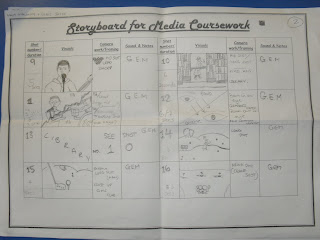
StoryBoard

Below are the pictures from the storyboard me and Matt have drawn up. Everything is shown here as it is our basic plan of action. Everything from shot number and shot duration to costume and character is noted here. Here are the pictures:


Tuesday, 12 October 2010

Preliminary Lip-Sync Exercise - Process

This process took place over the space of about two weeks, which is ALOT longer than we thought! Turns out that editing a music video is a lot more difficult than editing a thriller opening, and we haven't even added all the stereotypical effects and motions for the preliminary. The Process went as follows:

1) Find the track on the internet in video format - Luckily for us, someone else has previously used the same song from the same band before, for their own media coursework. Typing "1984 - Green Eyed Monster" into YouTube was sufficient enough to get this done :)

2) Extracting the song from the video - There are several websites that allow you to do this, and soon enough we had the song in itunes ready to be sent or used in any way we so pleased.

3) Song Portability - We put the song onto my blackberry, which has available MP3 usage. We did this by using the IMac bluetooth function and simply bluetoothed the song over. As well as this, we put the song onto my memory stick in order to make sure we had a good copy. We put it on the memory stick in QuickTime format as this is compatible with all computers within in the school, IMac or otherwise.

4) Rock-Paper-Scissors - This helped us to decide the singer. Me and Matt did rock-paper-scissors in order to decide who was the person to lip sync as we were equally familiar with the lyrics and song. I won, so Matt had to lip-sync, neither of us minded doing it, but this was just a bit of fun. Matt did very well with the lip-sync, so I'm sure he was the better choice. Maybe it was fate, if you believe in that?

5) Finding a Room - Finding a place to film within the school was hard as we did initially find a place, only for the bell to ring and a class spill in through the doors, meaning we had to quickly change room. We found another room and set-up the tripod and used the white board as a clean background, focusing mainly on Matt 'singing'. Luckily, the second room had a computer in, so we could plug in the memory stick, up the volume and Matt could lip-sync more easily. This also made it easier later on as we could match the song on the computer with the song in our footage when editing. Simples!

6) Edit Edit Edit - This turned out to be the longest part of the process, taking about a week to maintain the song and add external images and effects. Getting to grips with the new final-cut express tech was also challenging, but its turned out good and I'm not too shabby with it now. Its looking promising for the actual video. Luckily, Matt annunciates well, so the song was easy to fit with him mouthing the words. GOOD BOY!

7) Finished Product - Don't you love it when a plan comes together? Both me and Matt were happy with the final piece, especially after the effort it took to perform the above tasks. Despite this, we're both looking forward to shooting the actual video, should be a laugh and we plan on A grades!

Lip-Sync Video - Analysis

I am very happy with how the preliminary lip-sync task went. The task allowed us to:
  • Re-familiarise ourselves with the equipment
  • Get used to the new software (Final Cut Express)
  • Experience how to synchronise the audio and visuals
  • To practice lip-syncing.
  • To have a bit of a laugh :D
Whilst filming we encountered a couple of problems. Firstly, finding a place to film, especially on such short notice. We had trouble finding a room or even a site in which to find enough space to set up the camera for the length of time we wanted, which wasn't very long! We did 3 takes, purely because the first two were interrupted by people coming into the room and we wanted a flawless lip-sync. When we film whatever we do next (who knows we might do something before filming our actual video!) we need to plan much further ahead when thinking about location and setting.

We also didn't know if the new HD Camera's microphones were on. Now that we know it doesn't matter if they are on or off, we can continue with the work at a much faster pace.

Knowing the lyrics was also a problem, as some of the words were ambiguous. You can see in the video that what Matt is singing doesn't always match the lyrics. For example, the lyrics say "with all the boys and that", but at the time we though the lyrics were "with all the boys in maths", which is what Matt sings in the lip-sync video.


From the lip-sync preliminary, we know that for our main task we need to:

  1. Know the lyrics!
  2. Plan ahead with regards to setting and location.
  3. Know the technology!
Luckily, that is all that we had trouble with. Apart from these minor hiccups we were fine. Looking forward to beginning shooting the video!

Monday, 11 October 2010

Preliminary Lip-Sync Video


This is our A2 Music Video preliminary task. Its purpose was simply to get used to lip-synching, sing the words in time with the song and put them together in editing. Luckily, i've had a lot of free time, which means i've been able to play around, have fun and get used to the new final cut express software.

Enjoy!


Copyright Rules

Throughout all of media, whether it be music, film or magazines, there are certain rules that need to be obeyed regarding ownership and copyright. Relative companies have been set up so as these rules are followed to prevent infringement.

These rules regard to us as media students as much as they apply to large companies and record labels. We cannot use music that is copyrighted or has media-ownership. This is why we have to find our own bands and search for music that has no copyright. Sights like unsigned.com, mobygratis.com and freeplaymusic.com allow us to do this.


Luckily for us, this didn't prove too challenging as there are plenty of amazing artists out there waiting for people like us to find and enjoy their music. This whole process protects us from copyright infringement and allows us to get on peacefully with what we do best, making music videos!